Set the project name#
To avoid specifying the project to use when initializing Neptune, you can save the project name as an environment variable.
The full name of a Neptune project has the format workspace-name/project-name.
To find your project name:
- Open the project settings ( ).
-
Select Details & privacy.
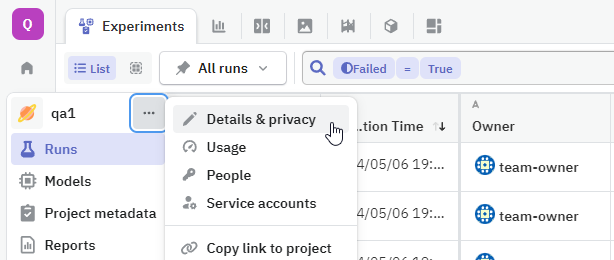
-
Find the copy button () next to the project name.
-
Assign the project name to an environment variable named
NEPTUNE_PROJECT:Append the following line to your
.profile(or other shell configuration file):where
workspace-name/project-nameis the full project name you just copied.Append the following line to your
.profile(or other shell configuration file):where
workspace-name/project-nameis the full project name you just copied.To set the project name permanently:
- Open a terminal app, such as PowerShell or Command Prompt.
-
Paste in the following command and press enter:
where
workspace-name/project-nameis the full project name you just copied. -
To activate the change, restart the terminal.
You can also navigate to Settings → Edit the system environment variables and add the variable there.
You can use the os library to set the project name as an environment variable:
where
workspace-name/project-nameis the full project name you just copied.Note that any environment variables declared this way won't persist after the notebook kernel shuts down. If you start a new kernel, they need to be set again.
Now that you've set the project name as an environment variable, you can omit the project parameter when initializing a Neptune object: